


Lockerpoint Oosterdok
per person
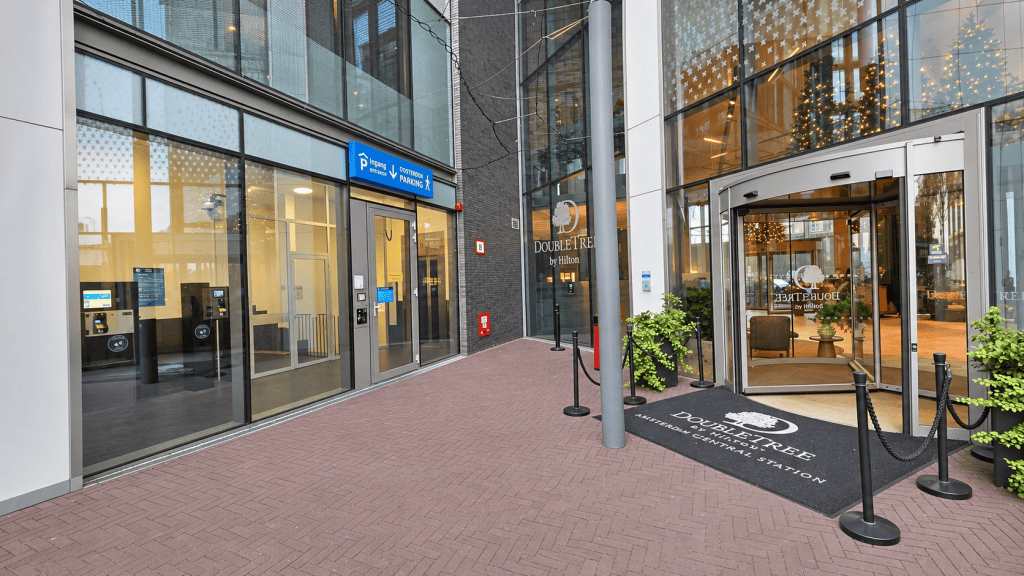
Store your luggage at Lockerpoint Oosterdok, on level -2 of Parking Centrum Oosterdok next to Amsterdam Central Station. Accessible 24/7. Rent online in advance and receive your access code by email.
Jump to: Rent a locker online
Want to explore Amsterdam without carrying your luggage around? At Lockerpoint Oosterdok, you can easily store your suitcase, backpack or weekend bag. Our luggage lockers are accessible 24/7 and are located on level -2 of Parking Centrum Oosterdok, on the east side of Amsterdam Central Station (link). You rent your locker online in advance via our web app and then receive the car park access code by email.
Explore the historic city centre, visit NEMO Science Museum or stroll along the Oosterdok waterfront. It is ideal if you cannot check in yet or have already checked out of your accommodation. You can reopen your locker during the rental period and collect your luggage whenever it suits you. Enjoy Amsterdam with your hands free.
Address
Lockerpoint Oosterdok (Amsterdam Central Station East)
Parking Centrum Oosterdok (level -2)
Oosterdoksstraat 150
1011 DK Amsterdam
+31 (0)20 221 8920
The lockers are located in Parking Centrum Oosterdok on level -2, on the east side of Amsterdam Central Station. Rent a locker online first. You will then receive the access code and instructions for entering the car park by email.
Opening hours
This location is open 24/7.
Sizes & prices
You can rent a locker here from €7 per 24 hours.
You can reopen your locker during the rental period. This location offers three locker sizes.
| Locker size | Price | |
| M | h30 x w35 x d60 cm (h11.81 x w13.78 x d23.62 inch) |
€7 |
| L | h50 x w35 x d78 cm (h19.69 x w13.78 x d30.71 inch) |
€9 |
| XL | h86 x w35 x d60 cm (h33.86 x w13.78 x d23.62 inch) |
€11 |
Rent a locker online
Book and pay online first. You will then receive the access code for Parking Centrum Oosterdok by email. Follow these steps to rent a locker:
- On the day you need a locker, go to app.lockerpoint.com/oosterdok.
- Select your rental period, enter your email address, choose a PIN and complete your payment. Your rental starts immediately after payment.
- Within 5 minutes of payment, you will receive a confirmation email with a link to open your locker. You will also receive the car park access code by email.
- Use the access code and follow the instructions in the email to enter the car park. Go to the lockers on level -2 and only open your locker when you are standing in front of it. If you open your locker but do not use it and leave the door open for 15 minutes, your reservation will expire automatically.
- Ready to collect your belongings? Open your locker using the link in your confirmation email or the terminal. Check out when you collect your belongings and close the door.
- Once payment is complete, your booking is final and cannot be cancelled. Refunds are not available.
Payment options
Book online via the web app
Go to app.lockerpoint.com/oosterdok and follow the instructions. Choose one of the available payment methods at checkout.
Use a payment terminal
You will find the payment terminal next to the lockers. You can pay with major debit and credit cards, including VISA, Maestro, American Express and Mastercard. Contactless payments with Apple Pay and Google Pay are also available.
Cash payments are not available at this location.
Facilities
- Open 24/7

- Rent a locker online via the web app
- Car park access code sent by email after booking

Tour Location